From scattered ads to one source of truth — in one diagnosis.
When you run a portfolio of Sponsored Products campaigns, the whole-store picture gets buried in per-campaign drill-downs. Luckee runs a full 8-phase health check across campaigns, keywords, and search terms — then hands you four ready-to-act Markdown reports. Macro and micro, in one pass.
Macro & Micro.
One scan covers the whole store at the campaign level — and drills all the way down to every keyword and user search term. Stop switching between five reports to answer one question.
Three-Dimensional.
Three diagnosis agents — campaign, keyword, and search-term — run in parallel. Each finding is cross-validated. Star, Healthy, Monitor, Problematic classification per campaign. Keep / Optimize / Observe / Negative per search term.
Action-Ready Reports.
Four Markdown reports + JSON summaries land in minutes — Consolidated, Campaign, Keyword, Search Term. Each row has a recommended action. Paste into Notion, Linear, or your weekly review.
More campaigns, less clarity.
The more SP campaigns you launch, the harder it is to see whole-store health. Amazon Ads Console shows everything individually; spreadsheets get stale; you end up reacting instead of optimizing. Here's what most sellers hit.
Portfolio scale, no overview
When you run a portfolio of campaigns, you can't manually inspect each one. Whole-store ACOS / ROAS / orders are buried in per-campaign drill-downs.
Keywords sit in noise
Some keywords convert. Others bleed budget. Without ranked status (Keep / Optimize / Observe / Negative), you can't tell which to pause first.
Search term review = manual
Hundreds of customer search terms per week. Identifying the keep candidates and the negative-list candidates by hand takes hours.
Adjust without evidence
You raise a bid, lower another, pause a third — based on memory. No structured report ties each action to actual spend / orders / ACOS evidence.
Full scope of what Ad Diagnosis covers.
Macro health check on every campaign. Micro drill-down on every keyword and search term. Cross-validated by three specialist agents. Delivered as four Markdown reports plus JSON.
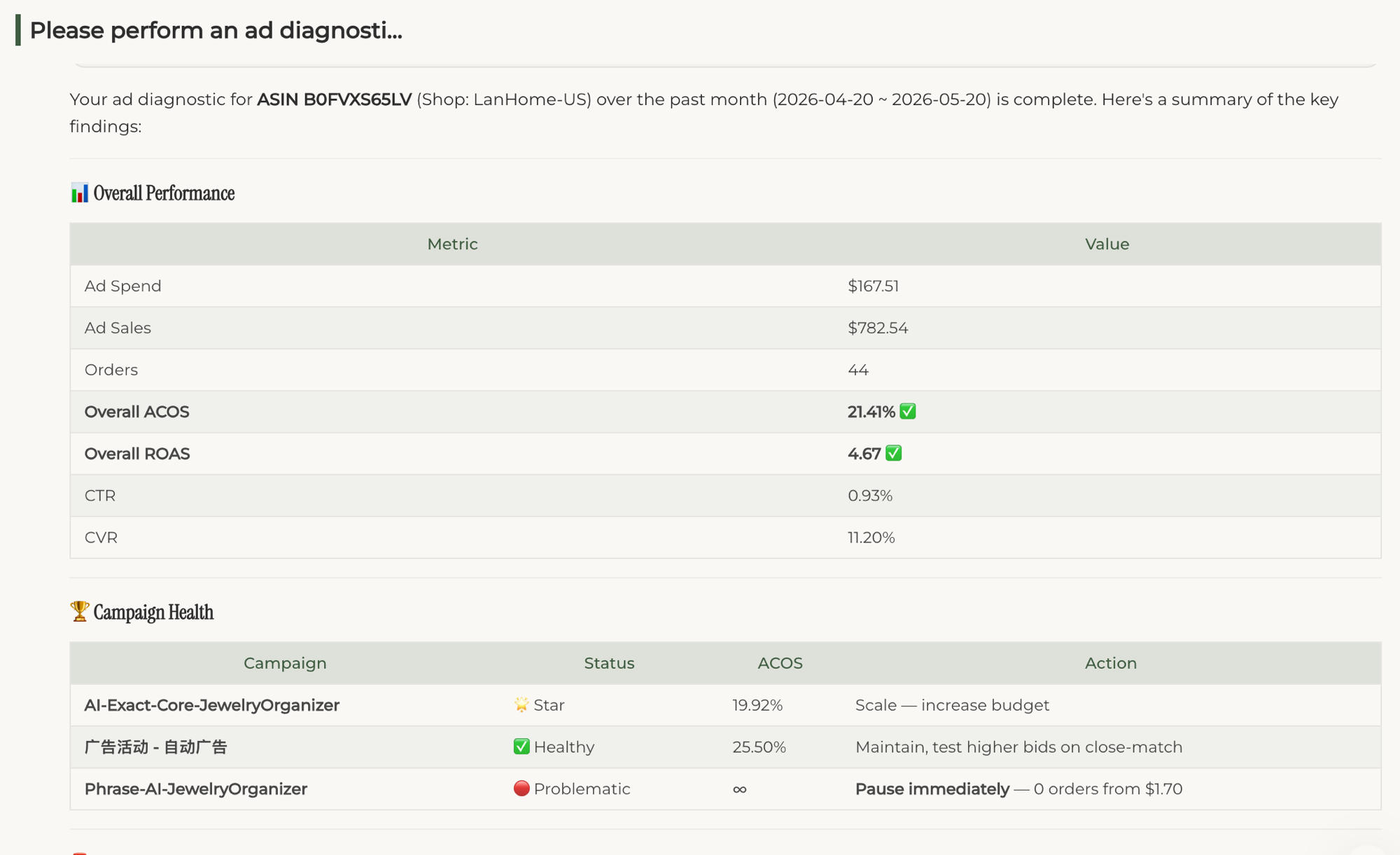
Whole-store campaign health, classified.
- Star / Healthy / Monitor / Problematic Each campaign auto-classified using ACOS, orders, ROAS, and spend share thresholds. Star (ACOS < 30% + Orders ≥ 5) and Problematic (∞ ACOS / zero orders) called out immediately.
- Core KPI Dashboard Ad Spend / Ad Sales / Orders / Overall ACOS / Overall ROAS / CTR / CVR / Average CPC — every metric in one place, ✅ flag on healthy thresholds.
- Spend Share Distribution See exactly what % of budget each health tier is consuming. Lopsided spend on Problematic campaigns surfaces instantly.
- Recommended Action per Campaign "Scale — increase budget" on Stars, "Pause immediately" on Problematic, "Maintain, test higher bids" on Healthy.
Every keyword, classified and scored.
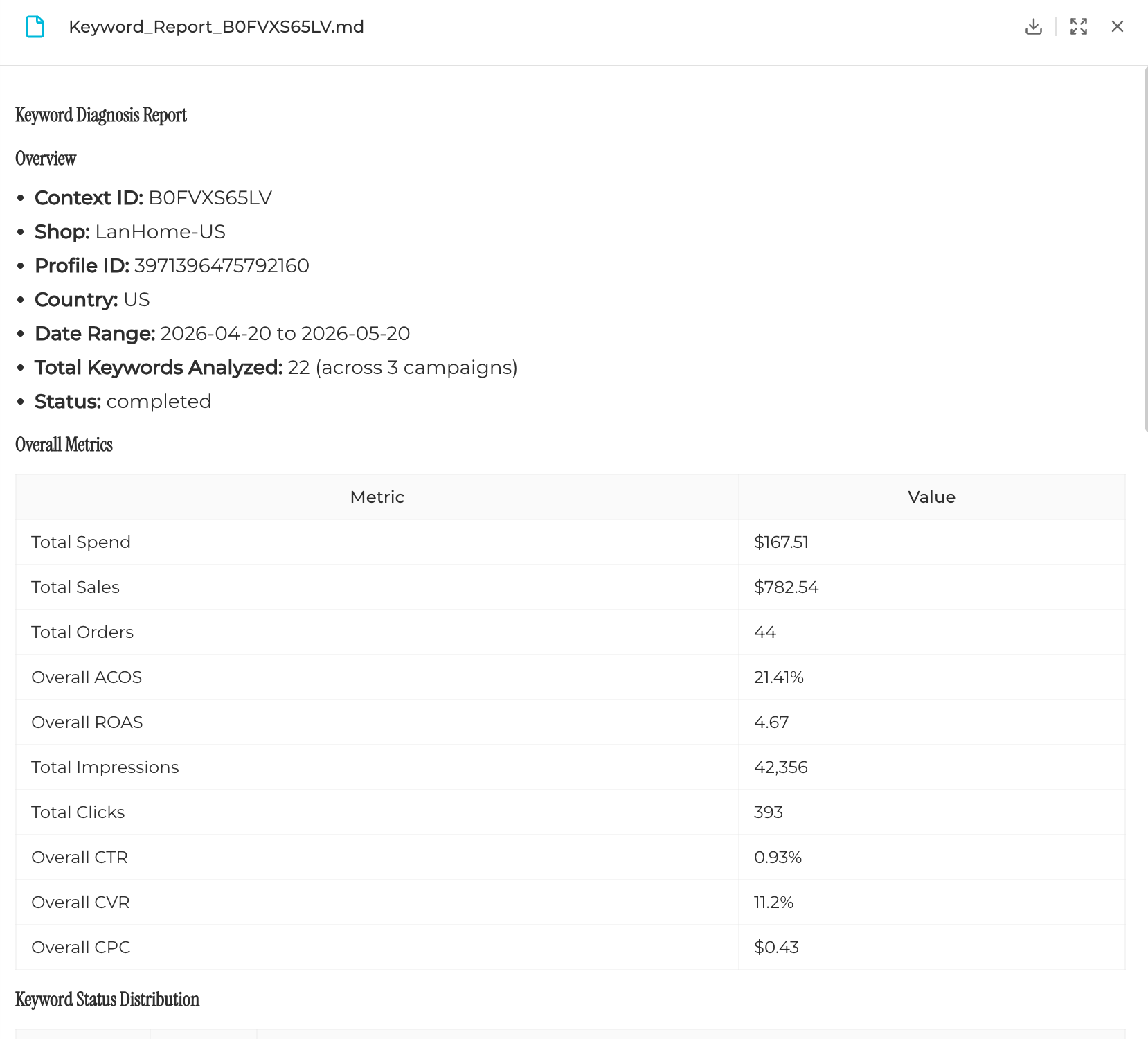
- Full Per-Keyword Metrics Every active keyword across every campaign in scope — spend, sales, orders, ACOS, ROAS, impressions, clicks, CTR, CVR, CPC — with a status and recommended action on each row.
- 4-Tier Status Auto-Classification Keep / Optimize / Observe / Pause — auto-applied per keyword based on configurable spend, orders, and ACOS thresholds.
- Match-Type Aware Exact, Phrase, and Broad keywords analyzed separately. Migrate winners from broad to exact; negative-list under-performers without losing winners.
- Daily Budget Cap Detection Auto-flags campaigns where a low daily budget is capping volume on high-ROAS keywords — so you raise budget where it actually returns.
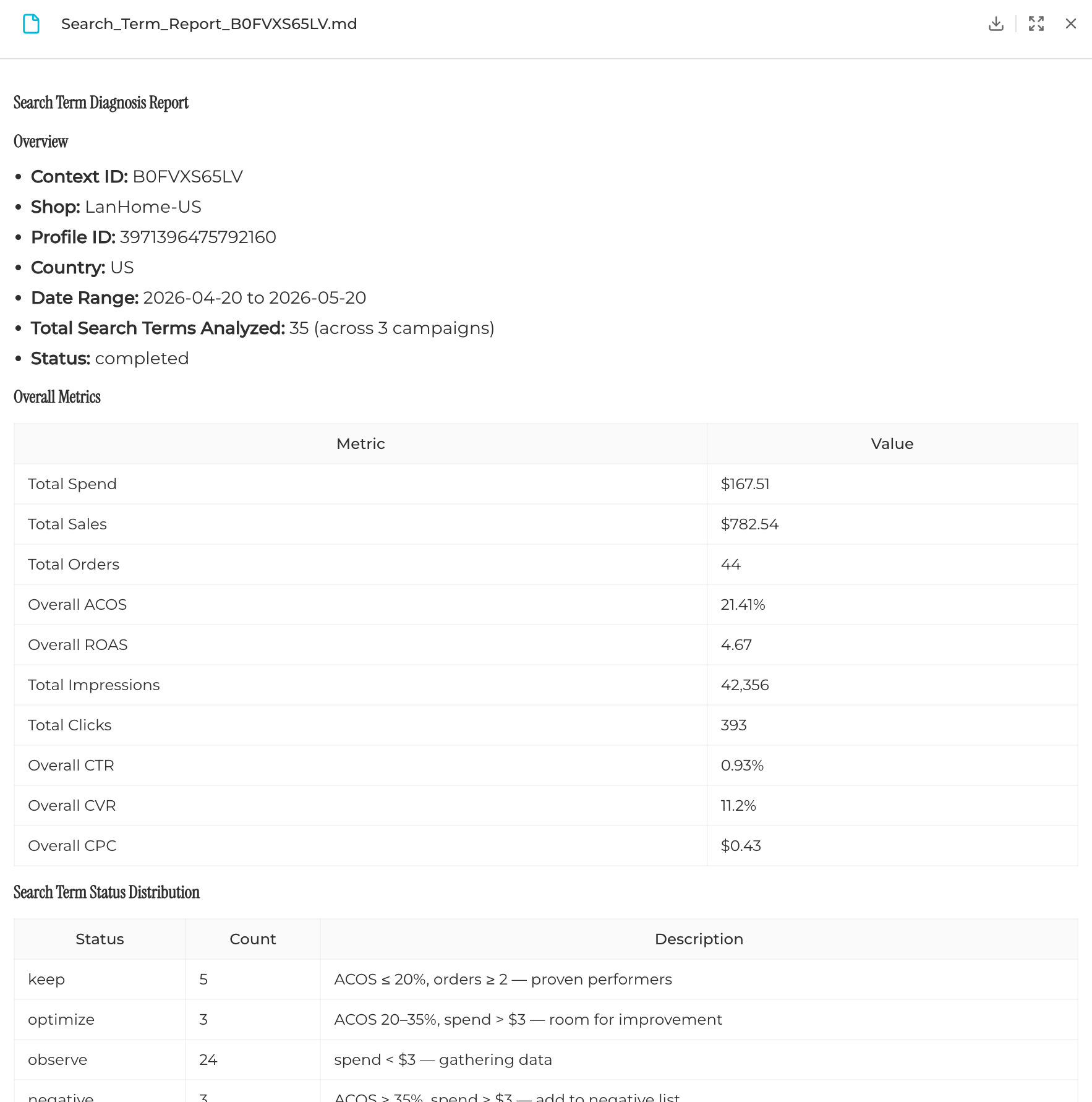
Keep, optimize, observe, negative — labeled.
- Every Customer Search Term Every actual customer query that triggered your ads, with click / order / ACOS data and a status label you can act on — no manual sampling, full coverage.
- 4-Tier Auto-Classification Keep (ACOS ≤ 20%, orders ≥ 2 — proven performers) · Optimize (ACOS 20–35%, spend > $3) · Observe (spend < $3, gathering data) · Negative (ACOS > 35%, spend > $3 — add to negative list).
- Migration Suggestions When an auto-campaign search term shows strong ROAS, the report recommends promoting it to a dedicated exact-match keyword — with the ROAS evidence attached. Move proven auto-campaign winners into tighter match types without guesswork.
- Negative List Drafts Ready-to-copy negative keyword list, exported with rationale (which search term, what ACOS, how much wasted spend).
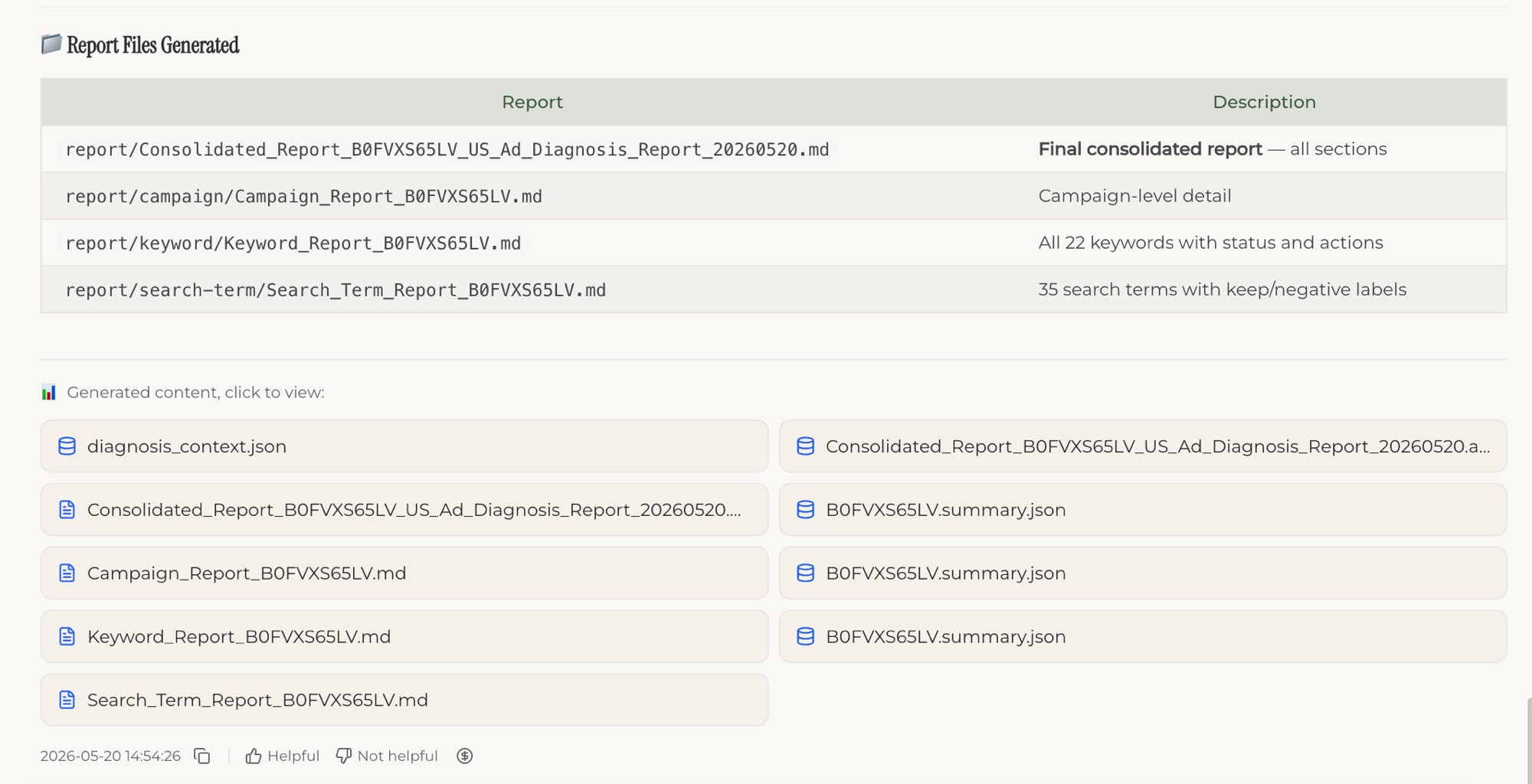
Four Markdown reports + JSON. Drop-in ready.
- Consolidated Report Executive Summary + Core Metrics Dashboard + Campaign Analysis + Keyword highlights + Search Term highlights + Next Steps. The one report to share with leadership.
- Three Detail Reports Campaign / Keyword / Search Term — each with overview, full metrics table, status distribution, and per-row actions. For execution.
- JSON Summaries Machine-readable .summary.json files per report — drop into dashboards, scripts, or downstream pipelines.
- Markdown-Native Paste into Notion, Linear, Slack, GitHub — no PDF export, no copy-paste fidelity loss.
Eight automated phases, one diagnosis.
Input ASIN + store + country + date range. Luckee orchestrates 9 specialist skills and 4 diagnosis agents — no manual coordination required.
Parameter Collection
Normalize store, ASIN, country, and date range. Detect language.
Resolve profile_id
shop-fetcher locates the SP advertising profile for the store.
Resolve portfolio_id
portfolio-fetcher narrows scope when needed (skipped in ASIN mode).
Fetch Full Ad Data
Pull campaign / keyword / search-term data for the period.
3-Dimensional Diagnosis
campaign-diagnoser + keyword-diagnoser + search-term-diagnoser run in parallel.
Generate Consolidated Report
markdown-generator stitches all findings into the executive view.
Validate Output
diagnosis-validator + logic-consistency-checker confirm internal coherence.
Deliver to User
4 .md reports + JSON summaries handed back — ready to act on.
See it on a real store.
LanHome jewelry organizer in the US marketplace. 30-day window. Luckee scanned 3 campaigns, 22 keywords, 35 search terms — and flagged exactly which keywords to scale, which to optimize, and which to pause.
LanHome Ad Diagnosis
Jewelry Organizer · 2026-04-20 → 2026-05-20 · US Marketplace · 3 campaigns · 22 keywords · 35 search terms
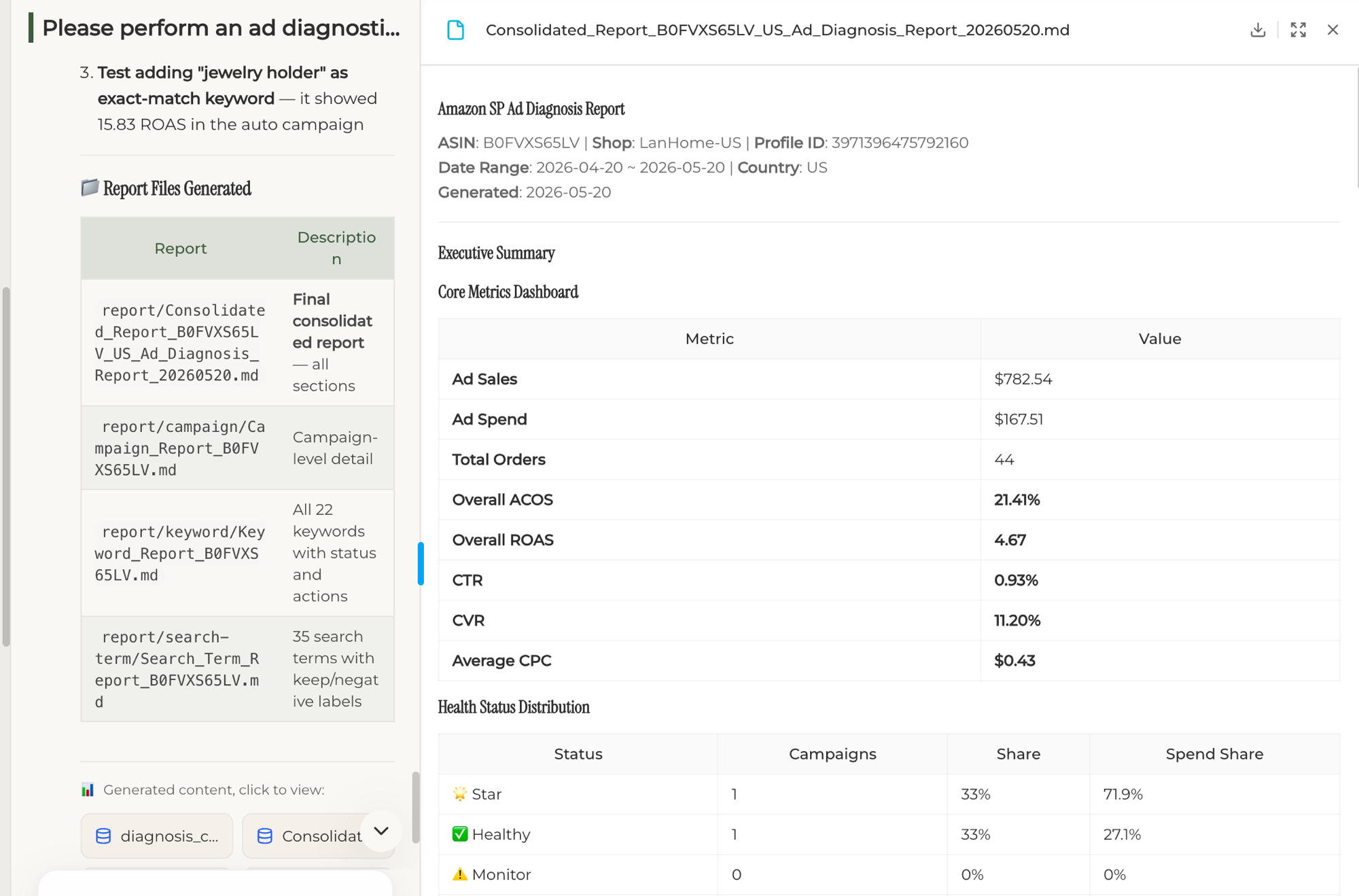
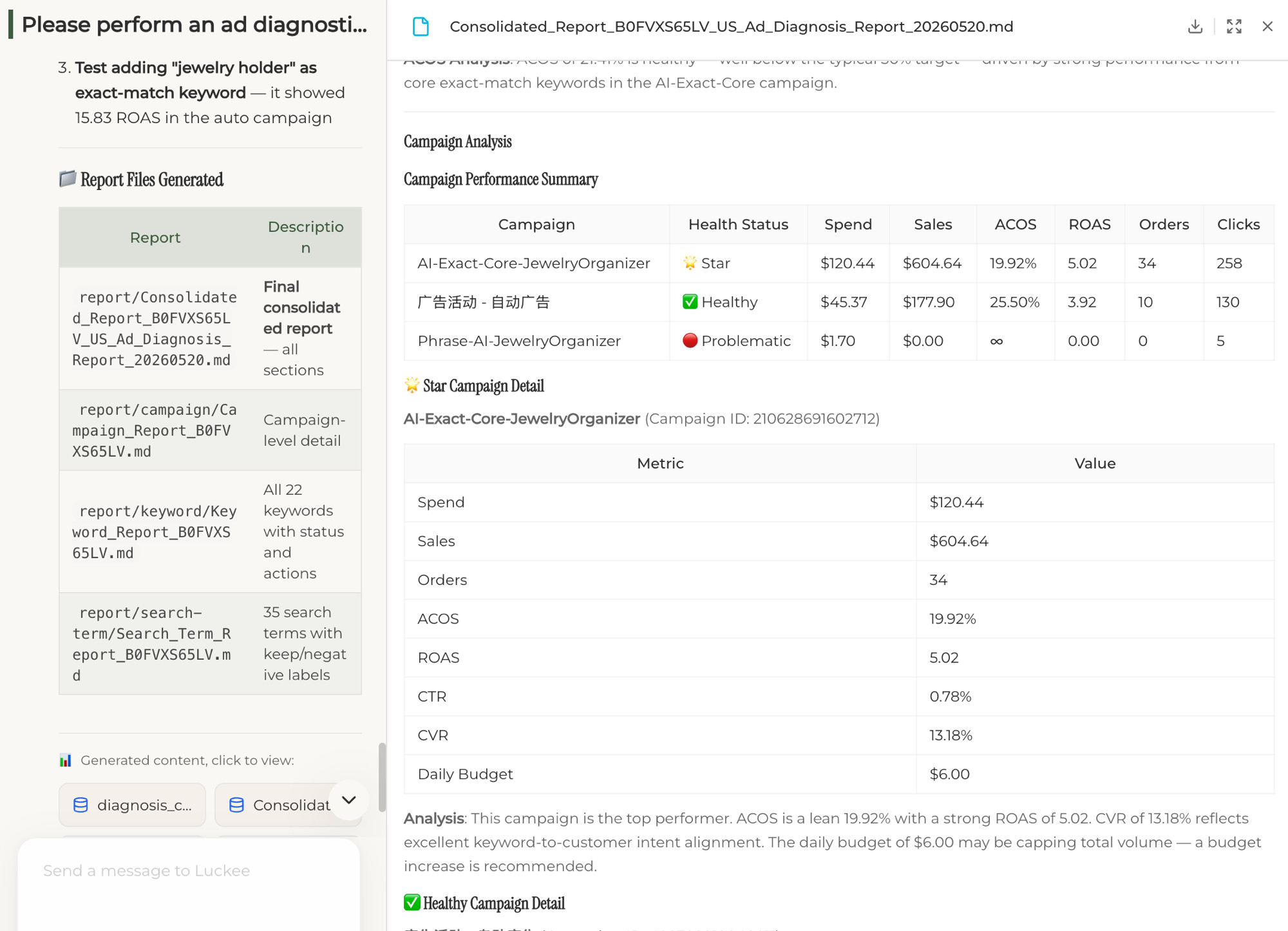
Executive view: Core Metrics Dashboard + Health Status Distribution + Campaign Analysis + Keyword highlights + Search Term highlights + Next Steps.
Per-campaign detail: spend, sales, ACOS, ROAS, orders, CTR, CVR, daily budget, health classification, and recommended action.
All 22 keywords with status (Keep / Optimize / Observe / Pause), match-type breakdown, and per-row recommended action.
35 customer search terms with keep / optimize / observe / negative labels, including migration suggestions and ready-to-copy negative list.
Where teams put Ad Diagnosis to work.
Monthly whole-store health check
Run one diagnosis per ASIN. Consolidated reports stack into a portfolio view. Star / Healthy / Problematic counts and overall spend share per tier — at a glance.
High-ACOS firefight
Diagnosis finds it in minutes. Per-dimension status isolates whether the bleed is one Problematic campaign, three high-ACOS keywords, or a flood of broad search terms — and tells you which to pause first.
Auto-to-Exact keyword migration
Search Term report flags "Test adding X as exact-match keyword — it showed Y ROAS in auto." Migrate winners into tighter match types without losing performers to broad noise.
Systematic negative-list build
Negative-list draft with rationale per term (ACOS, spend, click count). Copy-paste straight into Amazon Ads Console — defensible because every entry has data evidence.
Budget reallocation
Spend Share by health tier quantifies the lopsidedness. The report directly recommends per-campaign budget actions — increase budget on Stars that are budget-capped, pause Problematic spend bleeding into low-conversion campaigns.
Weekly review automation
Markdown-native reports drop straight into Notion / Linear / Slack. Run on schedule, compare week-over-week JSON summaries, and free your Monday for actual decisions.
Why this isn't something the Amazon Ads Console gives you.
Side-by-side, where Luckee Ad Diagnosis pulls ahead of native console, manual review, and existing seller tools.
| Amazon Ads Console | Manual Spreadsheet | Helium 10 / Sellerise | Luckee Ad Diagnosis | |
|---|---|---|---|---|
| Whole-store macro view | Per-campaign only | Possible (manual) | Dashboard view | 3-tier health classification |
| Keyword status labels | — | Manual rules | Keyword tracker | ✓ Keep / Optimize / Observe / Pause auto |
| Search term auto-labeling | — | Manual | Partial | ✓ Keep / Optimize / Observe / Negative |
| Negative list drafts | — | Manual | Manual | ✓ Ready-to-copy with rationale |
| Migration suggestions (auto → exact) | — | — | — | ✓ With ROAS evidence |
| Time to full report | Hours (manual stitching) | 2–4 hours | 30 min | Minutes, automated |
| Output format | Web UI only | Spreadsheet | Web UI + CSV | Markdown + JSON |
| Drop into Notion / Linear | — | Friction | Friction | ✓ Native paste |
Before you try it.
How often should I run a diagnosis?
Once per week for actively-managed ASINs. Once per month for stable / seasonal SKUs. For 30-day rolling windows you get healthy trend visibility; for 7-day windows you get faster optimization signal but more noise.
Can I diagnose multiple ASINs in one batch?
Yes — run per ASIN, then stack the consolidated reports into a portfolio view. The JSON summaries are designed for cross-ASIN aggregation (e.g. portfolio-level ACOS, total spend share by health tier).
Does it work for Auto campaigns?
Yes. Auto campaigns get full search-term analysis — including "test as exact match" migration suggestions when an auto-discovered search term shows strong ROAS. Auto + Manual coverage in one report.
Can I customize the health-classification thresholds?
Yes. Default thresholds: Star = ACOS < 30% + Orders ≥ 5; Healthy = ACOS 30–50% + Orders ≥ 1; Search-term Keep = ACOS ≤ 20% + Orders ≥ 2; Negative = ACOS > 35% + Spend > $3. All thresholds are configurable per category / margin profile.
Is this real data or estimated?
Real data. Luckee uses Amazon's Sponsored Products API (via shop-fetcher and full-ad-data-fetcher skills) — same data source as the Ads Console. Numbers match.
How fast is one diagnosis?
2–4 minutes for a mid-sized ASIN diagnosis — including data fetch, three parallel diagnosis agents, consolidation, validation, and four-report generation. Larger campaigns (hundreds of keywords / thousands of search terms) take 5–8 minutes.
Stop guessing. Diagnose your ads.
Run Ad Diagnosis on one of your ASINs free. Four Markdown reports + JSON, in under 5 minutes.